
Are you trying to join a Blooket game right now? You are in the right place.
Blooket is one of the most fun ways to learn. It feels like a video game, not a quiz. But sometimes, getting into the game can be tricky. Maybe your code is wrong. Maybe the screen is stuck.
I will help you fix that.
In this guide, I will show you exactly how to join. I will also teach you what to do if the game breaks. Plus, I will explain the game modes so you can win.
Let’s get you into the game!
Contents
How to Join a Blooket Game (3 Fast Ways)
Most people only know one way to join. But there are actually three. Use the one that is easiest for you.
1. Join with a Game Code (Most Common)
This is the standard way. Your teacher or host will show a big code on their screen.
-
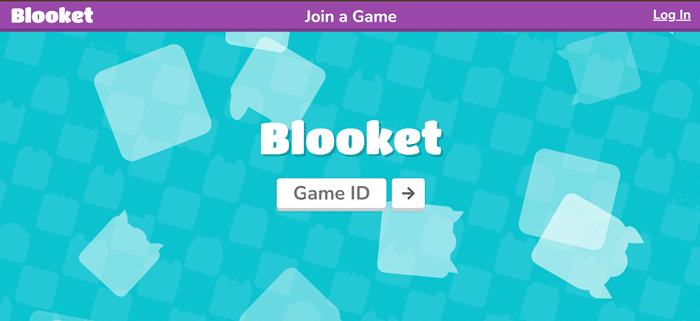
Step 1: Go to the Blooket Play page (play.blooket.com).
-
Step 2: You will see a box that says “Game ID.”
-
Step 3: Type in the 6 or 7-digit code.
-
Step 4: Click the arrow button or press Enter.
-
Step 5: Type your nickname.
-
Step 6: Choose your “Blook” (your character) and wait in the lobby.
2. Join with a QR Code
If you are using a phone or tablet, this is faster. Look at your teacher’s screen. Do you see a square barcode (QR code)?
-
Open your camera app.
-
Point it at the screen.
-
Tap the yellow link that pops up.
-
You are in! No typing needed.
3. Join with a Direct Link
Sometimes, your teacher will post a link in Google Classroom or Zoom.
-
Click the link.
-
That’s it! It skips the code step entirely. You just pick your name and play.
Pro Tip: Be quick! If you wait too long to pick a Blook, you might get a common one. Join fast to get the rare ones.
Help! My Join Code Isn’t Working (Troubleshooting)
Is the game not loading? Do you see an error message? Don’t panic. Try these simple fixes.
“Invalid Game Code” Error
This means the number is wrong, or the game has ended.
-
Check the numbers: Did you type a zero “0” instead of the letter “O”?
-
Ask the host: Codes expire. If the teacher closed the screen, the code is dead. You need a new one.
The Screen is White or Stuck
This happens a lot on school computers.
-
Refresh the page: Click the reload button (or press F5).
-
Clear Cache: Sometimes your browser gets “clogged.” Go to settings and clear your history.
-
Try a different link: If the main play link is blocked, ask your teacher for the direct join link.
For School Wi-Fi Issues
Schools block many websites. If Blooket won’t load, the school internet might be stopping it.
-
Tell your teacher: They need to ask the IT department to unblock firebaseio.com. This is the “engine” that runs the game. If it is blocked, you cannot join.
Do You Need an Account to Play?
The short answer is: No.
You can join any game as a “Guest.” You just type a name and play. This is great for a quick game.
But, creating a free account is better. Here is why:
| Feature | Guest (No Account) | Student Account |
| Join Games | Yes | Yes |
| Save Gold | No | Yes |
| Unlock Rare Blooks | No | Yes |
| Track Stats | No | Yes |
| Create Your Own Sets | No | Yes |
My Advice: If you play often, make an account. It is fun to collect coins and buy new Blook packs.
Game Modes Explained:
When you join, the game might look different each time. That is because Blooket has different “Modes.” Knowing the mode helps you win.
Here are the most popular ones you will see in 2025:
-
Gold Quest: This is about luck and speed. You answer questions to open chests. You can swap gold with other players.
-
Strategy: Keep your head down and answer fast. Don’t get mad if someone steals your gold!
-
-
Tower Defense: This is a strategy game. You build towers to stop enemies.
-
Strategy: Focus on answering questions to get points. Strong towers beat many weak ones.
-
-
Factory: You run a business. You answer questions to upgrade your factory units.
-
Strategy: Upgrade fast. Don’t save your money too long.
-
-
Battle Royale: This is head-to-head. You face one other student. If you answer faster, you win. The loser is out.
-
Strategy: Accuracy is key. One wrong answer can knock you out.
-
For Teachers:
If you are the one hosting the game, here are two tricks to make it run smoothly.
1. Stop the “Bots”
Sometimes, students use scripts to flood the game with fake players.
-
The Fix: Go to settings before you host. Check the box that says “Use Student Accounts Only.” This forces students to log in. Bots usually cannot get past this.
2. Manage the Lobby
If a student uses a rude name, you don’t have to restart the whole game.
-
The Fix: Just click on their name in the lobby. It will kick them out instantly.
Frequently Asked Questions (FAQs)
Can I join a game late?
Yes! As long as the game is still running, you can enter the code and join. You might be behind in points, though.
Why is my screen black?
This is usually a browser issue. Turn off your ad-blocker or extensions and reload the page.
Can I play Blooket by myself?
Yes. You can’t “join” a live game alone, but you can play “Solo” modes to practice. Just find a question set and click “Solo.”
How do I get legendary Blooks?
You need an account. Play games to earn tokens. Use tokens to buy packs in the Market. It is all about luck!
Is Blooket free?
Yes, it is 100% free to join and play. There are paid versions for teachers, but students don’t need to pay.