

You run a school. Kids need extra help sometimes. That’s where RTI comes in. RTI means Response to Intervention. It helps kids who struggle. An RTI scheduler is a tool to plan this help. It makes sure kids get the right support at the right time.
Think of it as a smart calendar. Teachers use it to set up meetings. Kids go to sessions for math help or reading boost. Or even talks with a counselor. This tool saves time. It tracks who goes where. No more mess with paper notes.
In this guide, we’ll cover all you need. We’ll show why it’s key. How to use it. And tips to make it work great. Your school can do better than others. Let’s start.
Contents
- 1 RTI Basics: What You Need to Know
- 2 Why Use an RTI Scheduler? It’s a Game Changer
- 3 Pick the Best RTI Scheduler for Your School
- 4 Step-by-Step: How to Schedule RTI Sessions
- 5 Keep Support Going for Better Results
- 6 Make Your Intervention Time Work Great
- 7 Common RTI Scheduling Problems and Fixes
- 8 RTI Scheduler Tools: A Quick Compare
- 9 FAQs on RTI Schedulers
- 10 Conclusion
RTI Basics: What You Need to Know
RTI is a way to help kids learn. It spots problems early. Then gives help right away.
There are three levels in RTI.
- Level 1: All kids get good teaching in class.
- Level 2: Some kids get small group help.
- Level 3: A few kids get one-on-one aid.
Schools set aside time for this. It might be 30 minutes a day. Or once a week. This time is for intervention or fun extras.
Without a scheduler, it’s hard to track. Kids might miss out. Teachers get stressed.
Why Use an RTI Scheduler? It’s a Game Changer
You might think, “I can do this with paper.” But that’s old school. An RTI scheduler makes things easy.
Here’s why you need one:
- Saves time: Set up fast. No long meetings.
- Tracks kids: See who needs what.
- Boosts results: Kids get help they need.
- Helps teachers: They focus on teaching, not planning.
Manual ways like hall passes take too long. They get lost. Data is hard to find. A tool fixes that.
Pick a tool that syncs with your school system. It should let kids sign up themselves sometimes.
Pick the Best RTI Scheduler for Your School
Not all tools are the same. You want one that fits.
Look for these:
- Easy to use: No hard tech.
- Custom options: Set rules for your school.
- Reports: See data on attendance and progress.
- Mobile access: Use on phones.
Some popular ones include RTI Scheduler and Enriching Students. Check reviews. Try free trials.
A good tool lets you group kids by needs. It sends reminders too.
Step-by-Step: How to Schedule RTI Sessions
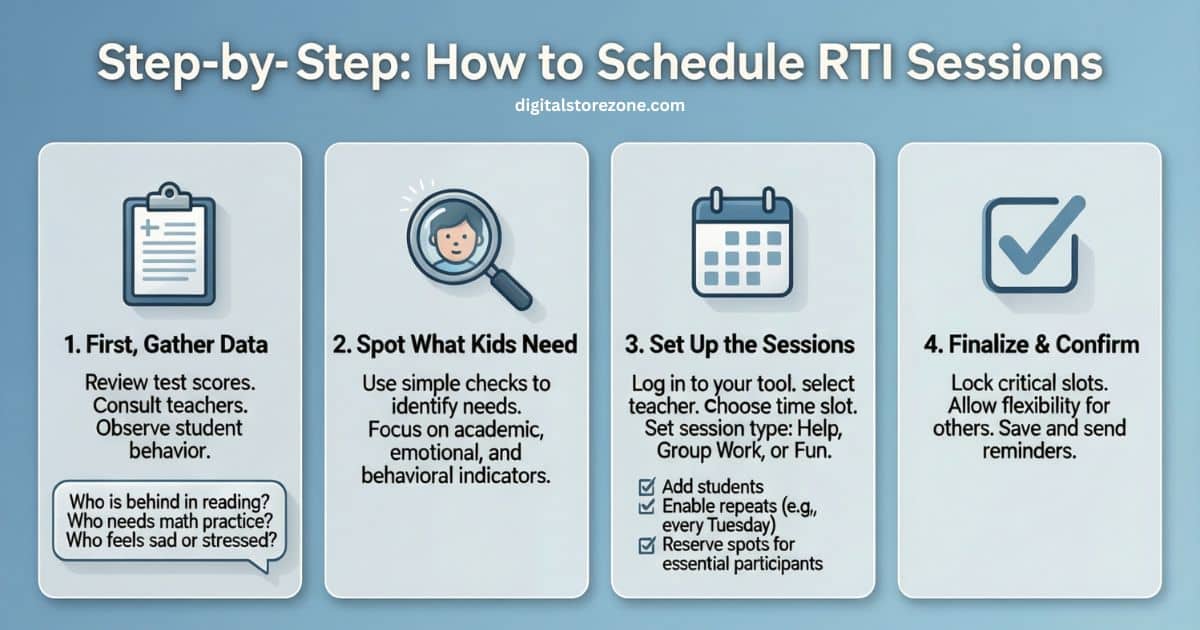
Ready to start? Here’s how.
First, gather data. Look at test scores. Talk to teachers. Ask kids.
Spot What Kids Need
Use simple checks:
- Who is behind in reading?
- Who needs math practice?
- Who feels sad or stressed?
Data shows the way. Pick the right help.
Set Up the Sessions
Log in to your tool.
- Choose the teacher.
- Pick the time slot.
- Set the type: Help, group work, or fun.
- Add kids to it.
Make it repeat if needed. Like every Tuesday.
Lock some spots for must-go kids. Let others choose.
Keep Support Going for Better Results
One session might not fix it. Kids need more sometimes.
Set up ongoing plans.
- Weekly math help for a month.
- Counselor talks every other day.
Check in often. See if it’s working. Change if not.
This builds skills over time. Kids feel supported.
Make Your Intervention Time Work Great
Plan well to win.
Don’t just wing it. Think ahead.
Top Planning Tips
- Group kids with same needs.
- Train teachers on what to do.
- Name it fun: Like “Power Time” or “Win Block.”
- Schedule it same time for all. No pull-outs.
This stops kids from feeling bad.
Track and Fix
Use your tool’s data.
Look at:
- Who shows up?
- Do scores go up?
Adjust based on that.
A table can help see patterns.
| Session Type | Attendance Rate | Progress Notes |
|---|---|---|
| Math Help | 90% | Scores up 15% |
| Reading Group | 85% | Better reading |
| Counselor | 95% | Happier kids |
Data like this guides you.
Common RTI Scheduling Problems and Fixes
Things can go wrong. Here’s help.
Problem: Teachers forget to schedule.
Fix: Send auto emails.
Problem: Kids skip sessions.
Fix: Make it fun. Reward showing up.
Problem: Too many kids need help.
Fix: Add more teachers or times.
Problem: Tool is hard to learn.
Fix: Do training days.
These tips keep things smooth.
RTI Scheduler Tools: A Quick Compare
Wonder which tool? Here’s a table.
| Tool Name | Key Features | Price Range |
|---|---|---|
| RTI Scheduler | Fast setup, self-sign up | $5 per kid/year |
| Enriching Students | Data tracks, groups easy | $4-6 per kid/year |
| Basic Calendar | Free, but no extras | Free |
Pick based on needs. Tools beat basic ones.
FAQs on RTI Schedulers
Got questions? Here are answers.
What is RTI?
It’s a plan to help kids who need it. Early and often.
Do all schools need a scheduler?
If you do interventions, yes. It makes life easy.
Can kids sign up themselves?
In some tools, yes. For enrichments.
How do I start?
Pick a tool. Train staff. Gather data.
What if a kid needs lots of help?
Set ongoing sessions. Check progress.
Is it just for academics?
No. For feelings and behavior too.
How to measure success?
Look at attendance and scores.
Can it work in small schools?
Yes. Even better. Easy to manage.
What about privacy?
Good tools keep data safe.
How often to schedule?
As needed. Weekly or daily.
There you go. Now you know all about RTI schedulers. Use this to make your school shine.
Conclusion
RTI Scheduler makes planning student interventions and enrichment simple and fast. With quick setup, student self-sign-up, auto data sync, easy attendance tracking, and clear reports, teachers save hours and focus on helping kids instead of paperwork. It removes scheduling stress, ensures the right support reaches the right students, and helps schools run smoother RTI/MTSS programs with better results and less confusion.